AI Photo to Sketch Converter

Photo to Sketch AI: Turn Pictures into Drawings

Transform portraits, pets, architecture, and product photos into hand-drawn graphite pencil sketches, classical ink-wash paintings, or crisp manga line art while keeping the original proportions recognizable.

  • Keeps the facial likeness, proportions, and silhouette of your original photo recognizable
  • Switch between 2B graphite pencil, charcoal, Chinese ink-wash, and manga ink linework
  • Fine-grained paper grain and cross-hatching instead of harsh edge-detection filters
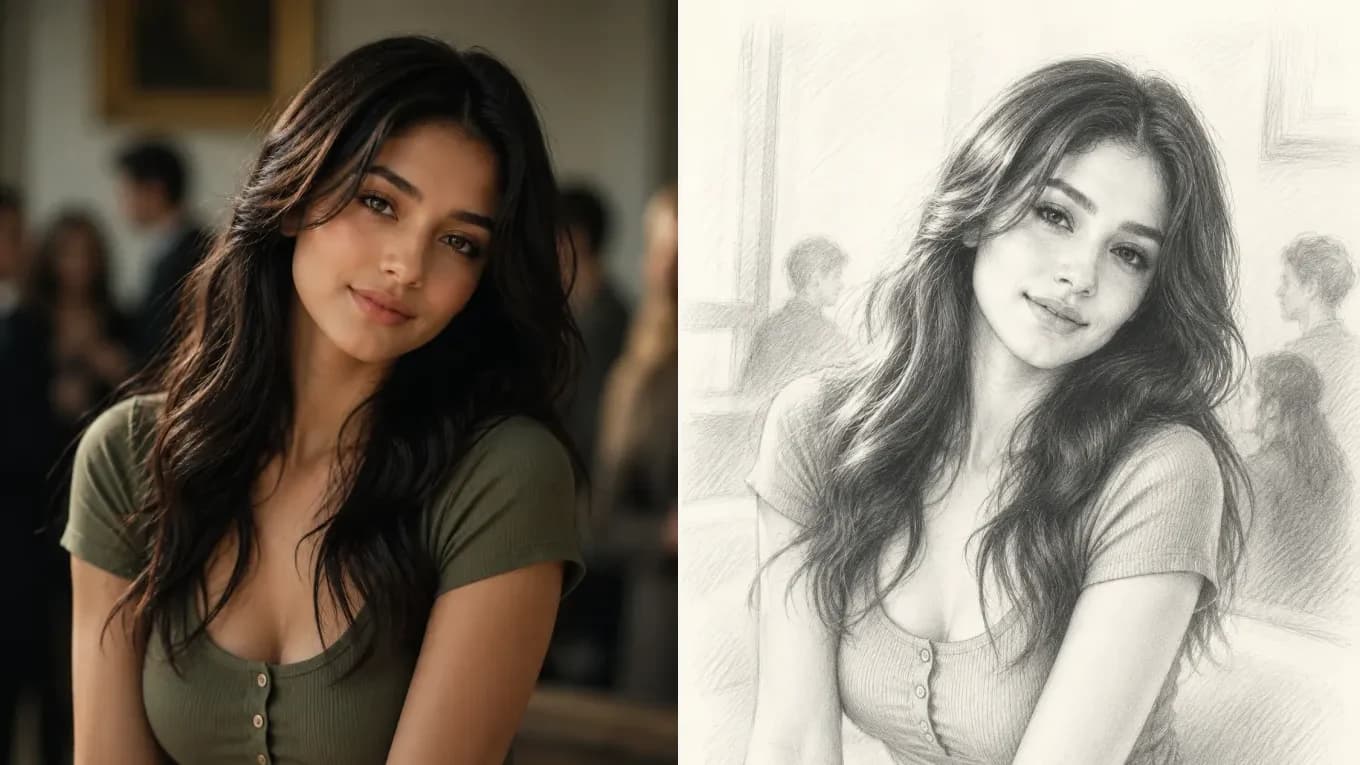
Original portrait photograph before AI photo-to-sketch conversion — Hand-drawn graphite pencil sketch converted from the portrait photoOriginal Portrait PhotoGraphite Pencil Sketch
AI photo-to-sketch conversion preserves eye alignment, hair flow, and collar contours while translating skin and lighting into realistic pencil hatching.

Live Photo to Sketch Studio

Upload a photo and choose your drawing medium

Upload any portrait, pet, or building photo, then specify pencil shading, ink linework, or watercolor wash in the prompt box.

Transformation studio

PNG, JPEG or WebP, up to 10 MB

Upload image0 of 1 images

Try these examples

Credits shown before you generate

Free tier1024 × 1024 · 1K · 1 image

Add an image and prompt to begin

Photo to Sketch Style Comparisons

Compare pencil, ink-wash, manga, and storybook line art

Every example below starts from a real photograph and converts surface textures into authentic drawing strokes while preserving subject identity.

Side-by-side comparison of a portrait photo and a hand-drawn graphite pencil sketch
Source photoAI output
Graphite Pencil Portrait

Fine 2B pencil portrait with soft cross-hatching

Translates portrait lighting and flowing hair into hand-drawn graphite strokes on cream sketchbook paper.

Convert this portrait photo into a detailed hand-drawn graphite pencil sketch on cream sketchbook paper, with delicate cross-hatching, realistic hair strand strokes, and exact facial likeness.
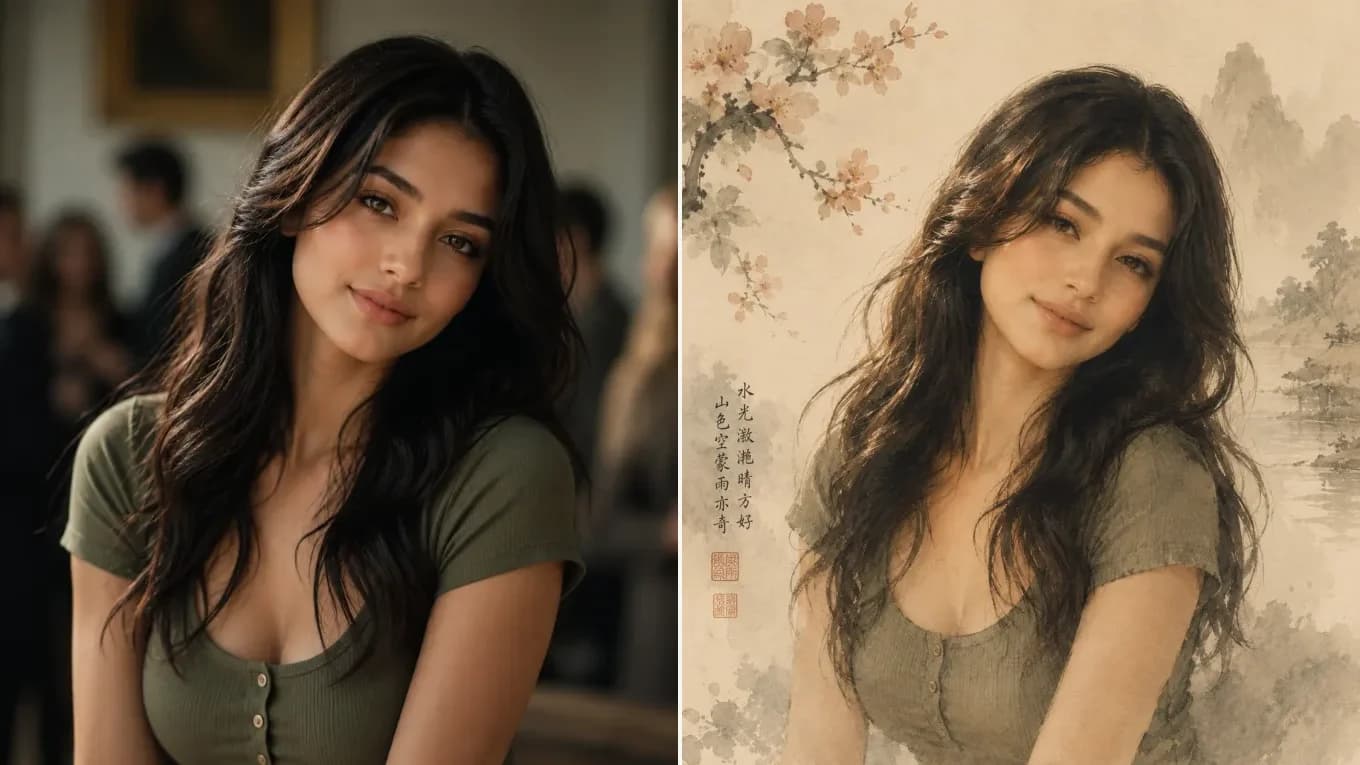
Side-by-side comparison of a portrait photo and a classical Chinese ink-wash painting
Source photoAI output
Classical Ink-Wash

Chinese Gongbi ink-wash & mineral pigment portrait

Combines delicate brush ink outlines with soft xuan-paper wash and cherry blossom branches while keeping the face recognizable.

Transform this portrait photo into a classical Chinese Gongbi ink-wash painting on aged xuan paper with delicate cherry blossom branches, preserving the exact facial features and pose.

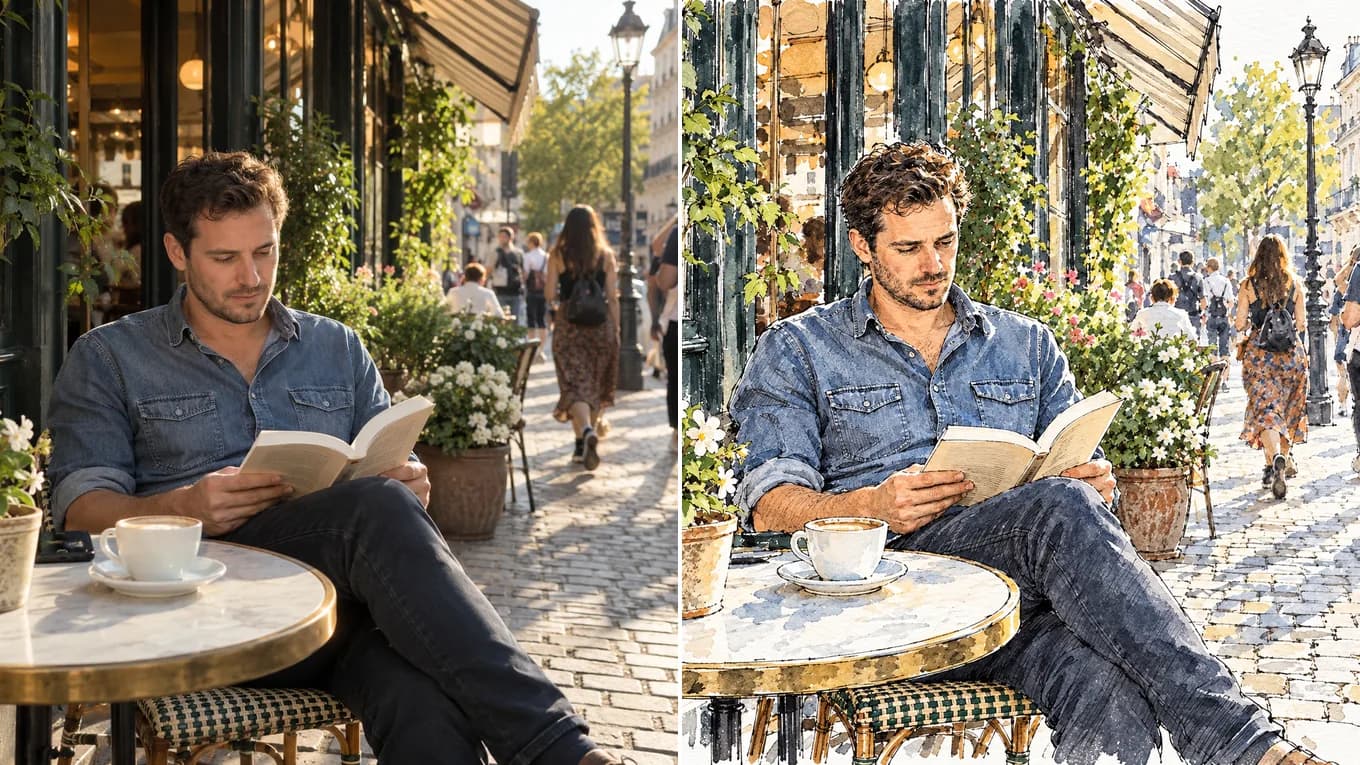
Before and after converting a café street photo into an ink-and-watercolor painting
Source photoAI output
Ink & Watercolor

Street photo to detailed ink-and-watercolor painting

Redraws a sidewalk café snapshot with ink outlines and watercolor washes, keeping the scene's detail.

Redraw this photo as a loose urban sketch: black ink pen lines on white watercolor paper with light watercolor washes, plenty of unpainted white paper, and visible brush strokes. Keep the same person, pose, and café scene.

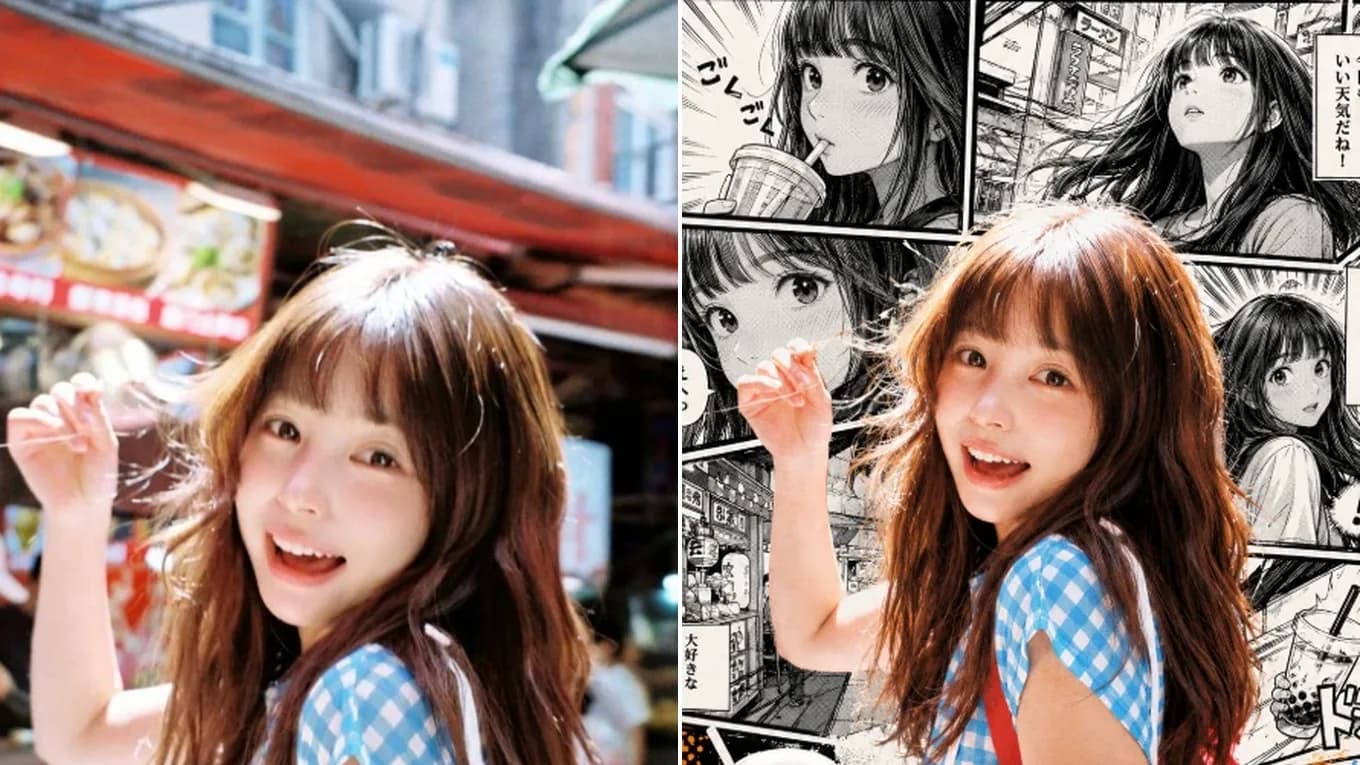
Side-by-side comparison of a portrait photo and monochrome manga ink line art
Source photoAI output
Manga Line Art

High-contrast monochrome manga ink & screentone

Renders crisp G-pen ink outlines, dramatic black shadow fills, and classic monochrome screentone shading.

Convert this portrait photo into a monochrome Japanese manga illustration with crisp G-pen ink linework, detailed hair highlights, and classic screentone shading while preserving the exact pose and expression.

Why AI Sketch Conversion Beats Basic Filters

Real stroke direction and shading instead of inverted edge filters

Old photo-to-sketch filters simply invert contrast and blur edges, leaving flat gray smudges on faces and hair. Image-to-image AI understands 3D facial planes, hair strands, and fabric folds—drawing directional pencil strokes, cross-hatching shadows, and clean contour lines on textured paper.

By specifying the paper stock (cold-press sketchbook, rice paper, Bristol board) and drawing tool (graphite pencil, charcoal stick, fine-liner ink), you control both line weight and tonal depth.

Accepted input formats
PNG, JPEG, and WebP up to 10 MB (portraits, pets, products, architecture)
Drawing styles supported
Graphite pencil sketch, charcoal portrait, Chinese ink-wash, manga screentone, storybook ink
Contour fidelity
Prompts anchor eye spacing, jawline, pose, and camera framing; compare faces at full size

Reviewed byImg2Img Product Team

Published / Updated /

ReferencesOpenAI Image Generation GuideGoogle Gemini Image Generation Docs

4-Step Sketch Workflow

How to convert a photo into a pencil sketch

Get clean linework and believable shading in four simple steps.

  1. 01

    Upload a well-lit photo

    Photos with clear light-and-shadow separation on the face or object produce the most expressive pencil shading and contour lines.

  2. 02

    Lock proportions and pose

    Tell the model which details must stay: facial features, glasses, hand position, or architectural perspective lines.

  3. 03

    Name the drawing medium and paper

    Specify '2B graphite pencil on rough sketch paper', 'charcoal drawing', 'technical ink line art', or 'Chinese ink-wash painting'.

  4. 04

    Adjust line weight and shading contrast

    Add terms like 'clean contour lines, minimal shading' for coloring-book outlines or 'deep chiaroscuro charcoal shading' for dramatic portraits.

Sketch Prompt Recipes

Copy-ready prompts for pencil, charcoal, and ink drawings

Click any recipe to load the prompt directly into the converter workspace.

Classic Graphite

Realistic pencil portrait on textured paper

Convert this photo into a realistic hand-drawn 2B and 4B graphite pencil sketch on textured cream drawing paper. Preserve the exact facial proportions, eye expression, and hair flow with fine cross-hatching.

Ideal for human portraits, pet memorials, and framed gift sketches.

Use sketch prompt
Clean Line Art

Architectural & product technical ink drawing

Turn this photo into a clean architectural fineliner ink drawing on white Bristol board. Keep all perspective lines, proportions, and structural details exact with crisp black linework and light stippled shading.

Great for buildings, interiors, industrial design, and coloring outlines.

Use sketch prompt
Expressive Charcoal

Dramatic charcoal figure study

Transform this portrait into an expressive willow charcoal drawing on toned paper with bold shadow massing, smudged midtones, white chalk highlights, and exact subject likeness.

Creates high-contrast fine-art gallery texture from studio portraits.

Use sketch prompt

Explore Workflows & Models

Switch between specialized editing workflows and reference-ready models

Every page uses the same image-to-image workspace so you can test prompts across portrait editing, sketch conversion, and multi-image fusion.

Prompt-Guided AI Image Editor

AI Image Editor

Edit photos with natural language prompts using our free AI image editor. Restore old photos, change outfits, relight portraits, and swap product scenes while keeping the original composition.

Open in Studio
AI Old Photo Restoration & Colorization

Old Photo Restoration

Restore damaged, scratched, and faded vintage photos online with AI. Remove paper creases, glare, and tears while colorizing monochrome portraits with natural skin tones.

Open in Studio
AI Shadow Remover & Portrait Relighting

Remove Shadow from Photo

Remove unwanted facial shadows, background glare, and hard lighting shadows from photos online with AI. Relight portraits and product shots while keeping the original subject recognizable.

Open in Studio
AI Filter Remover & Color Neutralization

Remove Filter from Photo

Remove Instagram, TikTok, and oversaturated color filters from photos online with AI. Neutralize warm orange and magenta color casts to restore authentic skin tones and clean lighting.

Open in Studio
AI Watermark Remover & Inpainting

AI Watermark Remover

Remove watermarks, logos, timestamps, and unwanted text from photos online with AI. Seamlessly reconstruct hidden background textures without blur.

Open in Studio
AI Image Extender & Outpainting Tool

AI Expand Image

Expand photos and uncrop images beyond their original borders online with AI. Extend vertical 9:16 portraits to 16:9 widescreen wallpapers with seamless continuity.

Open in Studio
Multi-Model Image-to-Image Directory

AI Image Models

Compare top image-to-image AI models side by side. Explore Nano Banana 2, GPT Image 2.5, Qwen Image Edit, and Seedream 5.0 for reference-guided photo editing and restyling.

Explore model guide
Google Gemini Flash Image Architecture

Nano Banana 2

Multi-person portrait fusion, character consistency, rapid conversational photo edits

Explore model guide
OpenAI Multimodal Image Architecture

GPT Image 2.5

Interior redesign, commercial product scenes, complex prompt-guided restyling

Explore model guide
Alibaba Qwen Vision-Language Editing Architecture

Qwen Image Edit

Targeted hair/outfit edits, vintage photo restoration, sign & packaging text edits

Explore model guide
ByteDance Seedream 5.0 Visual Generation Engine

Seedream 5.0

Ink-wash & anime restyling, high-fashion editorial portraits, 4K visual campaigns

Explore model guide
Black Forest Labs Flux Architecture

Flux Kontext

Commercial advertising, brand packaging preservation, architectural concept design

Explore model guide
xAI Grok Visual Intelligence Engine

Grok Imagine AI

Viral social media cards, 3D pop-out framing, bold retro pixel-art transformations

Explore model guide

Photo to Sketch FAQ

Questions about converting photos to drawings

Everything you need to know about turning portraits, pets, and scenes into sketches.

Does the AI photo-to-sketch converter keep the person's real face?

It aims to. The converter works from your photo rather than a generic style preset, and the prompt anchors eye spacing, nose bridge, smile, and hairstyle while the surface is redrawn in pencil or ink. Generative models redraw every pixel, so likeness can shift slightly; compare faces at full size before you share.

Can I create clean black-and-white outlines without heavy shading?

Yes. Include 'clean black ink contour line art on pure white background, no gray shading' in your prompt to generate crisp line drawings suitable for stencils or coloring pages.

What types of photos work best for pencil sketch conversion?

Portraits, pet close-ups, street photography, and architectural shots with clear contrast between light and shadow translate best into graphite and charcoal strokes.

Can I convert a photo into colored pencil or watercolor sketch?

Absolutely. Simply replace 'graphite pencil' in the prompt with 'colored pencil illustration on textured paper' or 'ink line sketch with soft watercolor wash'.

Is the photo to sketch tool free to test online?

Yes. You can upload your image and test sketch prompts in the browser studio using our free tier or starter credits.

What image resolution and formats can I upload?

We support PNG, JPEG, and WebP files up to 10 MB and up to 8,192×8,192 pixels.