AI Filter Remover & Color Neutralization

Remove Filter from Photo: Restore Natural Skin Tones

Reverse aggressive social media color grading, oversaturated warm tints, and artificial night-club color casts. Restore authentic complexion, true fabric hues, and neutral daylight with a single instruction.

  • Removes heavy Instagram orange-teal, night-club neon casts, and aggressive beauty filters
  • Restores authentic skin undertones, eye clarity, and true garment colors
  • Keeps pose, expression, and background composition as the visual anchor; compare before downloading
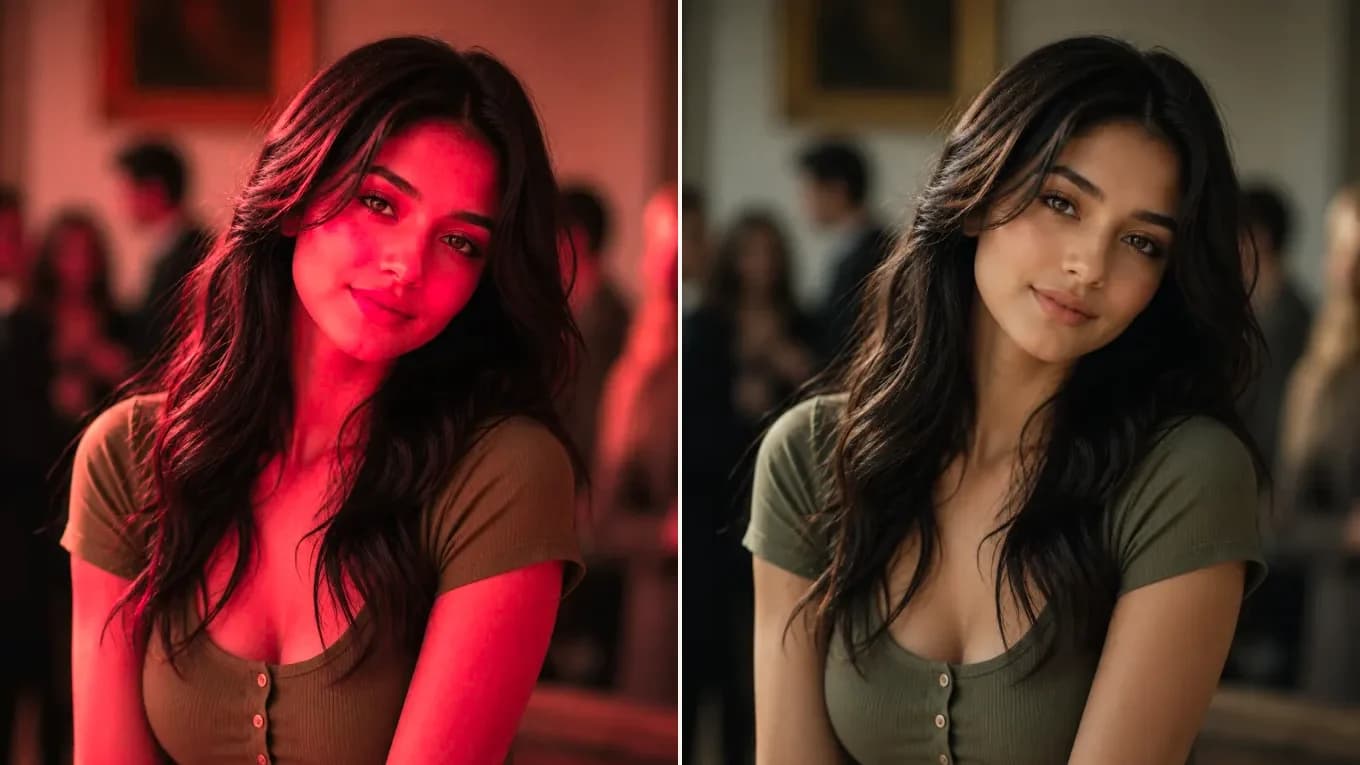
Portrait covered in heavy red and magenta party club color cast filter — Clean portrait with neutral white balance and authentic natural skin tonesHeavy Color Cast FilterNatural Neutral Lighting
AI filter removal identifies artificial color bias across highlights and shadows and rebalances the image toward clean neutral daylight, with facial features as the anchor.

Live Filter Remover Studio

Upload your filtered picture and restore clean balance

Upload any photo with artificial color bias. Instruct the AI to 'remove the heavy color filter and restore natural daylight'.

Transformation studio

PNG, JPEG or WebP, up to 10 MB

Upload image0 of 1 images

Try these examples

Credits shown before you generate

Free tier1024 × 1024 · 1K · 1 image

Add an image and prompt to begin

Filter Removal Before & After Gallery

From oversaturated tint to natural clarity

See how heavy social filters are neutralized while subject details stay sharp.

Before and after removing heavy red party club filter
Source photoAI output
Club Neon Removal

Neutralize heavy magenta and red party lighting

Erases unnatural red night-club cast and recovers clean porcelain skin tones.

Keep the exact person, facial identity, and clothing. Remove the heavy saturated red and magenta night-club color filter, restore natural daylight white balance and authentic skin tones.
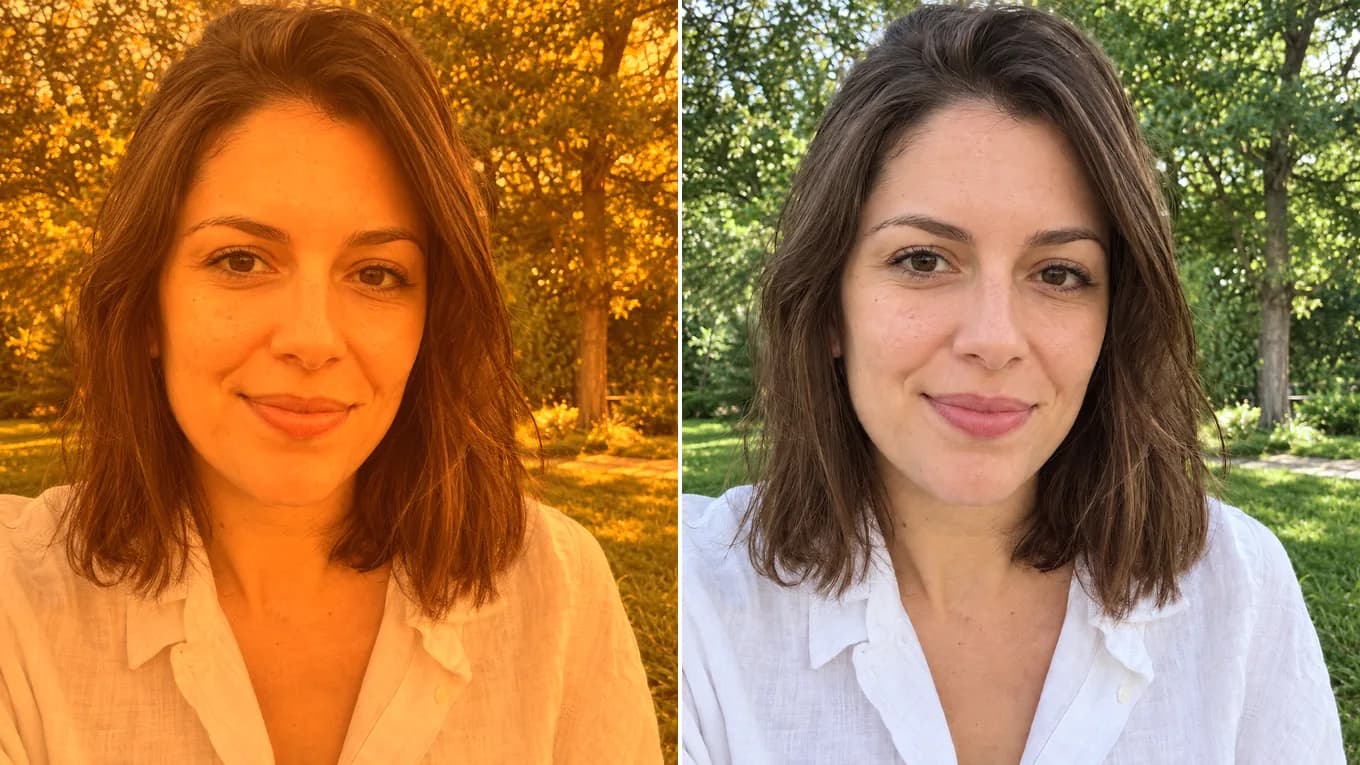
Before and after removing a heavy orange filter from a selfie
Source photoAI output
Warm Orange Neutralization

Rebalance oversaturated sunset selfie filters

Removes the muddy orange tanning tint from skin, hair, and trees and brings back a natural complexion.

Remove the heavy orange tanning filter from this selfie, restore clean natural skin tone and soft neutral daylight.

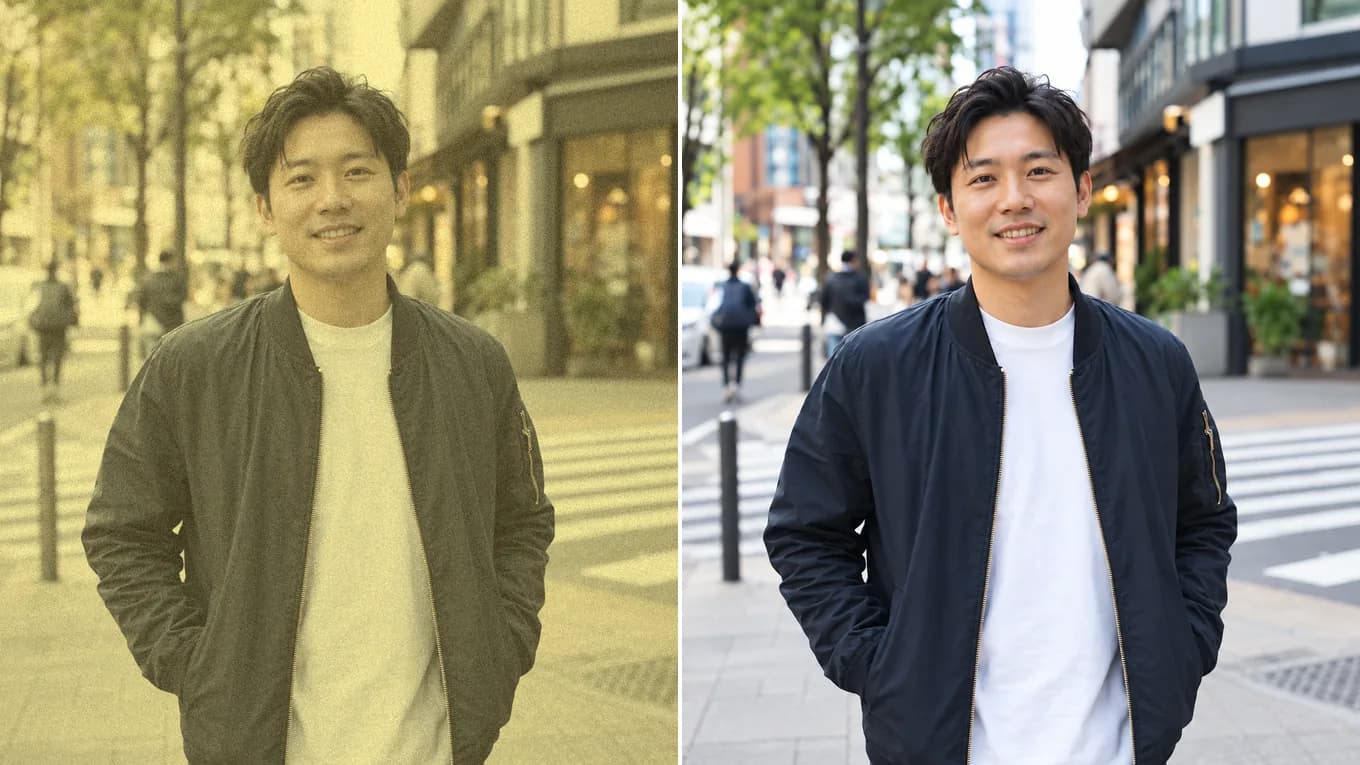
Before and after clearing a fake vintage yellow filter from a street snapshot
Source photoAI output
Sepia & Vintage Tint

Clear aged yellow filter from modern snapshots

Removes the artificial retro yellow fade and grain from a street snapshot and brings back clean whites.

Remove the fake vintage yellow filter, restore crisp modern color depth, natural skin tones, and clean neutral whites.

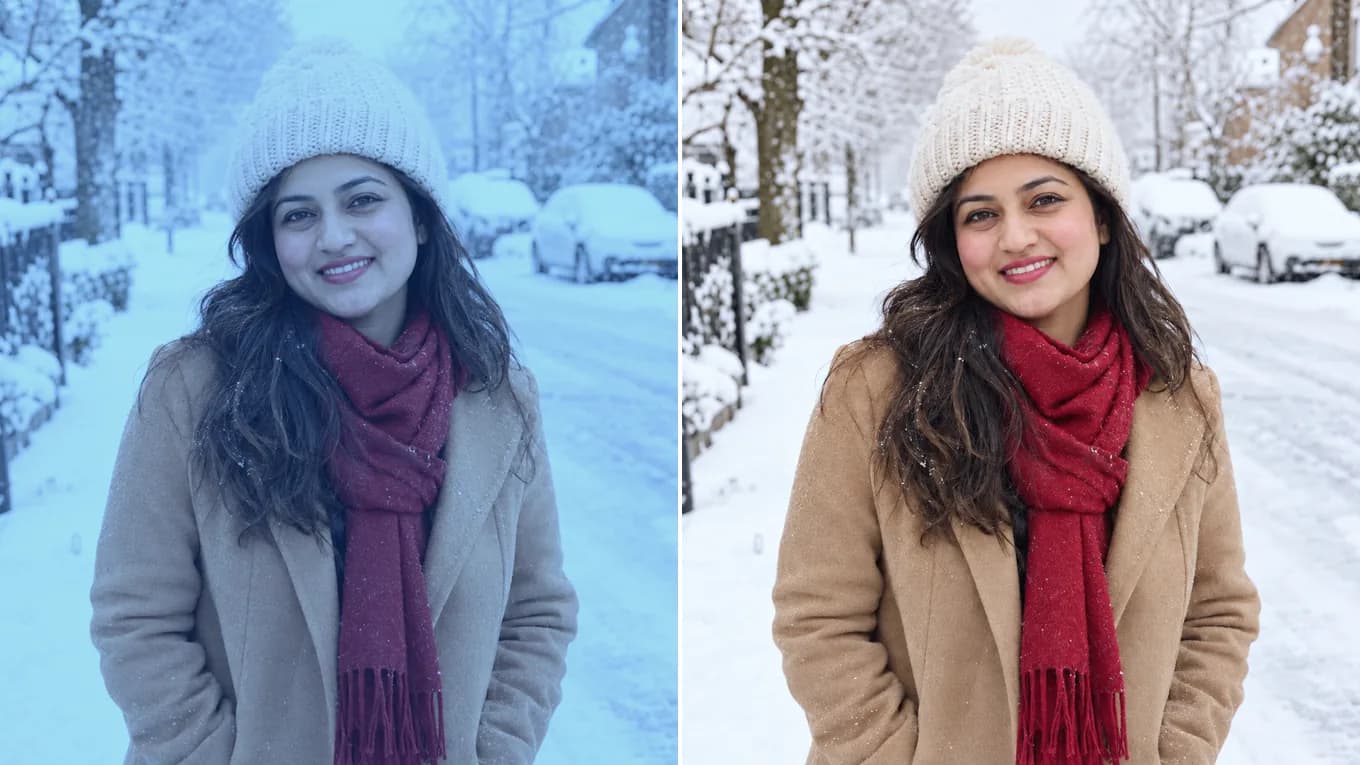
Before and after removing a cold blue filter from a winter portrait
Source photoAI output
Cool Blue Tint Removal

Remove a cold blue filter from a winter photo

Clears the icy blue cast from skin and snow and brings back the warm camel coat and red scarf.

Remove the cold blue color filter from this winter photo. Restore natural skin tones, clean white snow, and neutral daylight while keeping the same person, outfit, and scene.

Color Science & Color Grading Inversion

Why AI filter removal recovers true colors where LUTs fail

The model separates the underlying scene from the applied color filter layer, restoring authentic melanin pigment in the skin and neutral whites in background elements.

State the target lighting condition in your prompt (e.g. 'clean neutral studio lighting, natural peach skin tone').

Accepted formats
PNG, JPEG, WebP up to 10 MB per file
Filters removed
Warm orange-teal, vintage yellow fade, club neon glow, heavy smoothing filters
Fidelity lock
Prompts anchor facial geometry and scene layout; review fine details at full size

Reviewed byImg2Img Product Team

Published / Updated /

ReferencesOpenAI Image Generation GuideGoogle Gemini Image Generation Docs

4-Step Filter Removal Workflow

How to remove a filter from a photo

Four steps to restore true-to-life colors.

  1. 01

    Upload your filtered picture

    Select the photo with unwanted social media color grading or heavy neon cast.

  2. 02

    Lock facial features and pose

    Instruct the model to keep the person's face, smile, and outfit unchanged.

  3. 03

    Specify natural white balance

    Instruct 'remove the heavy color filter, restore true-to-life natural skin tones and clean daylight'.

  4. 04

    Export clean photo

    Inspect color accuracy in natural light, then download your un-filtered image.

Filter Removal Prompts

Formulas to reverse heavy photo filters

Click any prompt to load directly into the studio workspace.

Natural Skin

Reverse heavy orange/magenta filter

Keep the person's exact face, expression, and clothing. Remove the saturated color filter, restore clean natural skin tone and soft neutral daylight.

Universal fix for Instagram and TikTok oversaturated filters.

Use filter removal prompt
Studio Clean

Neutralize warm yellow indoor lighting

Keep the exact person and background composition. Neutralize warm tungsten yellow cast, replace with clean 5500K daylight balanced lighting.

Fixes photos taken under ugly yellowish indoor lamps.

Use filter removal prompt
True Colors

Restore true garment and product colors

Keep the uploaded subject geometry and details exact. Remove all stylized tinting filters, accurately restoring true fabric pigments and clean white highlights.

Crucial for e-commerce apparel color accuracy.

Use filter removal prompt

Explore Workflows & Models

Switch between specialized editing workflows and reference-ready models

Every page uses the same image-to-image workspace so you can test prompts across portrait editing, sketch conversion, and multi-image fusion.

Prompt-Guided AI Image Editor

AI Image Editor

Edit photos with natural language prompts using our free AI image editor. Restore old photos, change outfits, relight portraits, and swap product scenes while keeping the original composition.

Open in Studio
AI Photo to Sketch Converter

Photo to Sketch AI

Convert any photo to pencil sketch, charcoal drawing, ink-wash painting, or manga line art online with AI, keeping the likeness, pose, and composition recognizable.

Open in Studio
AI Old Photo Restoration & Colorization

Old Photo Restoration

Restore damaged, scratched, and faded vintage photos online with AI. Remove paper creases, glare, and tears while colorizing monochrome portraits with natural skin tones.

Open in Studio
AI Shadow Remover & Portrait Relighting

Remove Shadow from Photo

Remove unwanted facial shadows, background glare, and hard lighting shadows from photos online with AI. Relight portraits and product shots while keeping the original subject recognizable.

Open in Studio
AI Watermark Remover & Inpainting

AI Watermark Remover

Remove watermarks, logos, timestamps, and unwanted text from photos online with AI. Seamlessly reconstruct hidden background textures without blur.

Open in Studio
AI Image Extender & Outpainting Tool

AI Expand Image

Expand photos and uncrop images beyond their original borders online with AI. Extend vertical 9:16 portraits to 16:9 widescreen wallpapers with seamless continuity.

Open in Studio
Multi-Model Image-to-Image Directory

AI Image Models

Compare top image-to-image AI models side by side. Explore Nano Banana 2, GPT Image 2.5, Qwen Image Edit, and Seedream 5.0 for reference-guided photo editing and restyling.

Explore model guide
Google Gemini Flash Image Architecture

Nano Banana 2

Multi-person portrait fusion, character consistency, rapid conversational photo edits

Explore model guide
OpenAI Multimodal Image Architecture

GPT Image 2.5

Interior redesign, commercial product scenes, complex prompt-guided restyling

Explore model guide
Alibaba Qwen Vision-Language Editing Architecture

Qwen Image Edit

Targeted hair/outfit edits, vintage photo restoration, sign & packaging text edits

Explore model guide
ByteDance Seedream 5.0 Visual Generation Engine

Seedream 5.0

Ink-wash & anime restyling, high-fashion editorial portraits, 4K visual campaigns

Explore model guide
Black Forest Labs Flux Architecture

Flux Kontext

Commercial advertising, brand packaging preservation, architectural concept design

Explore model guide
xAI Grok Visual Intelligence Engine

Grok Imagine AI

Viral social media cards, 3D pop-out framing, bold retro pixel-art transformations

Explore model guide

Filter Removal FAQ

Questions about removing filters from photos

How AI removes heavy social media filters and recovers original colors.

Can AI really remove a filter applied in an app like Instagram or VSCO?

Yes. By analyzing the structural image information and natural human skin spectrums, the AI can reverse color curves and rebalance the image to neutral daylight.

Will removing the filter change how my face looks?

It shouldn't change much. The prompt asks the model to keep your face, eye shape, and expression and to change only color and lighting balance. Because the model redraws the full image, compare eyes and skin texture at full size before you post.

Can I remove neon night-club lighting casts?

Yes. Saturated magenta, cyan, and red ambient club lights can be neutralized to reveal clear natural skin.

What image formats and file limits apply?

Supports PNG, JPEG, and WebP up to 10 MB per image and up to 8,192 pixels.

Is the filter remover free to use online?

Yes. You can test filter removal in the studio with our free model tier or starter credits.

Which model works best for color cast removal?

Qwen Image Edit provides the highest precision for neutralizing color casts while preserving fine makeup details.