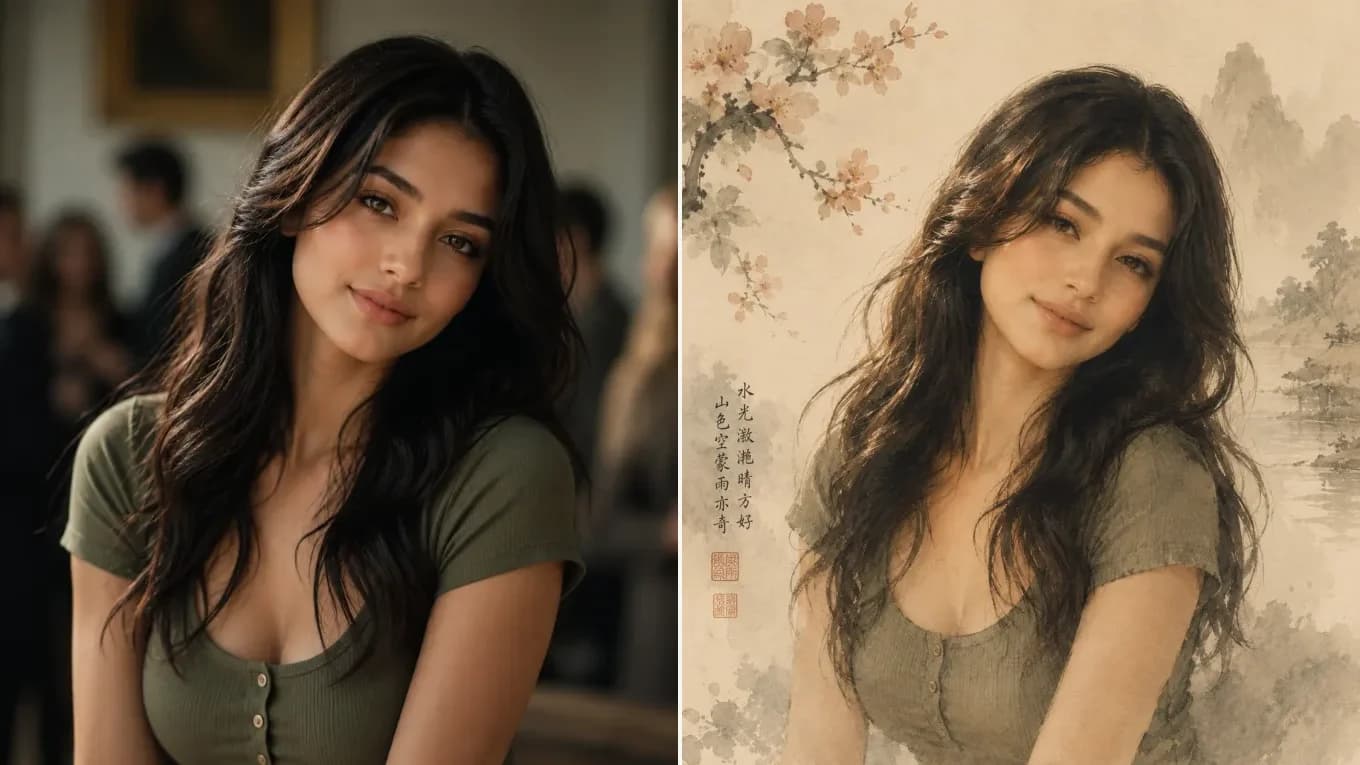
Source photoAI output
Classical Ink-Wash
Portrait photo to Chinese Gongbi ink-wash painting
Renders xuan-paper texture, ink mountain wash, and fine hair strands while keeping the gaze and head tilt.
Seedream 5.0 combines up to 14 reference images with cinema-grade color science, delicate brushwork, and native 2K/4K output—making it the top choice for classical ink-wash, anime, manga, and editorial fashion restyling.
Original Portrait PhotoSeedream 5.0 Ink-Wash RestyleSeedream 5.0 Image-to-Image
Upload your photo once, pick Nano Banana 2, GPT Image 2.5, Qwen Image Edit, or Seedream 5.0 in the model selector, and compare outputs directly.
Seedream 5.0 Visual Showcase
See how Seedream 5.0 translates photographs into classical ink-wash paintings, monochrome manga, and pencil sketches while keeping subject likeness.
Renders xuan-paper texture, ink mountain wash, and fine hair strands while keeping the gaze and head tilt.
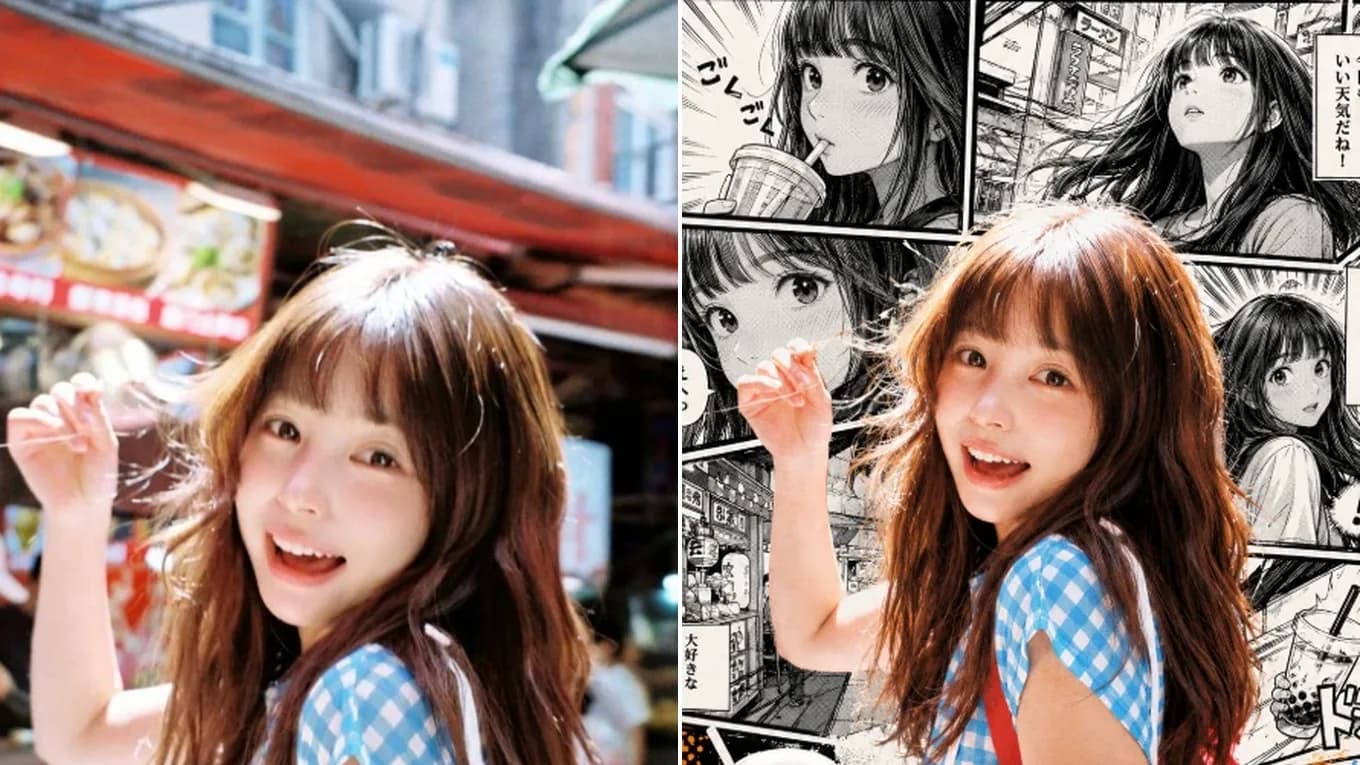
Produces expressive ink line weight, detailed eyelashes, and authentic manga screentone gradients.
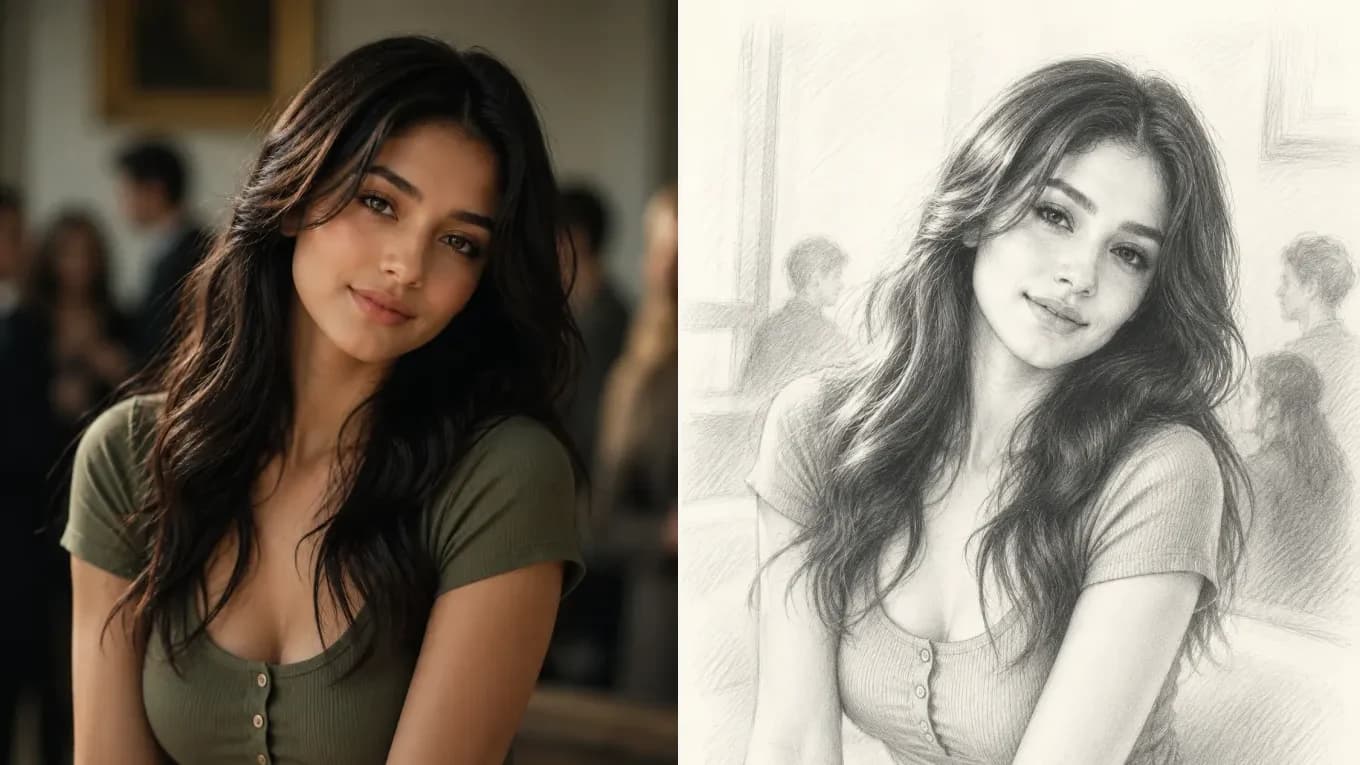
Preserves soft facial contours and collar folds with realistic 2B pencil hatching on cream drawing paper.
Seedream 5.0 Workflow
Combine reference structure with rich artistic direction in four steps.
Use Seedream 5.0 Lite for fast 2K style exploration or Seedream 5.0 Pro when you need ultra-crisp 4K final renders.
Upload your subject photo alone, or pair a subject photo with a second style-reference image.
Name the exact medium—such as Gongbi ink-wash, cel-shaded anime, oil impasto, or editorial film grain.
Choose 2K for standard web/social publishing or 4K for print-grade illustration and campaign banners.
Reviewed byImg2Img Product Team
Published / Updated /
ReferencesOpenAI Image Generation GuideGoogle Gemini Image Generation Docs
Seedream 5.0 Prompt Recipes
Load any artistic restyling formula directly into the studio.
Transform this portrait into a classical Chinese ink-wash and mineral pigment painting on textured xuan paper, keeping the exact facial identity, head tilt, and gentle expression.
Showcases Seedream 5.0's signature Eastern aesthetic brushwork.
Convert this photo into a high-detail cinematic anime film frame with luminous sky lighting, delicate eye reflections, and clean cel shading while preserving the exact pose and composition.
Preserves camera framing while upgrading color harmony.
Keep the exact model identity and pose from the uploaded photo. Restyle with dramatic editorial chiaroscuro lighting, rich film grain, and a minimalist architectural backdrop.
Best paired with Seedream 5.0 Pro at 2K or 4K resolution.
Explore Workflows & Models
Multi-person portrait fusion, character consistency, rapid conversational photo edits
Interior redesign, commercial product scenes, complex prompt-guided restyling
Targeted hair/outfit edits, vintage photo restoration, sign & packaging text edits
Commercial advertising, brand packaging preservation, architectural concept design
Viral social media cards, 3D pop-out framing, bold retro pixel-art transformations
Edit photos with natural language prompts using our free AI image editor. Restore old photos, change outfits, relight portraits, and swap product scenes while keeping the original composition.
Convert any photo to pencil sketch, charcoal drawing, ink-wash painting, or manga line art online with AI, keeping the likeness, pose, and composition recognizable.
Restore damaged, scratched, and faded vintage photos online with AI. Remove paper creases, glare, and tears while colorizing monochrome portraits with natural skin tones.
Remove unwanted facial shadows, background glare, and hard lighting shadows from photos online with AI. Relight portraits and product shots while keeping the original subject recognizable.
Remove Instagram, TikTok, and oversaturated color filters from photos online with AI. Neutralize warm orange and magenta color casts to restore authentic skin tones and clean lighting.
Remove watermarks, logos, timestamps, and unwanted text from photos online with AI. Seamlessly reconstruct hidden background textures without blur.
Expand photos and uncrop images beyond their original borders online with AI. Extend vertical 9:16 portraits to 16:9 widescreen wallpapers with seamless continuity.
Seedream 5.0 FAQ
Learn the differences between Seedream 5.0 Lite and Pro and how to get the best artistic output.
Both models accept up to 14 reference images and support 2K resolution. Seedream 5.0 Lite is optimized for faster, lower-credit 2K iterations, while Seedream 5.0 Pro unlocks native 4K resolution and finer micro-texture rendering.
Pick Seedream 5.0 for full restyles such as ink-wash, anime, manga, or editorial fashion looks, where the whole image should take on a new style. For small local fixes, Qwen Image Edit changes less of the image.
Seedream 5.0 starts at 6 credits per image. The studio shows the estimate for your settings before you generate, and failed generations return the credits.
Seedream 5.0 is widely recognized for Eastern ink-wash aesthetics, anime and manga illustration, 3D clay/toy restyling, and high-fashion editorial portrait lighting.
Yes. Because Seedream 5.0 supports up to 14 reference images, you can upload your portrait as image 1 and a style reference as image 2, then instruct the model to apply the artistic style of image 2 to the person in image 1.
Seedream 5.0 supports 1:1, 4:3, 3:4, 3:2, 2:3, 16:9, 9:16, and ultra-wide 21:9 aspect ratios.