Source photoAI output
Local Attribute Edit
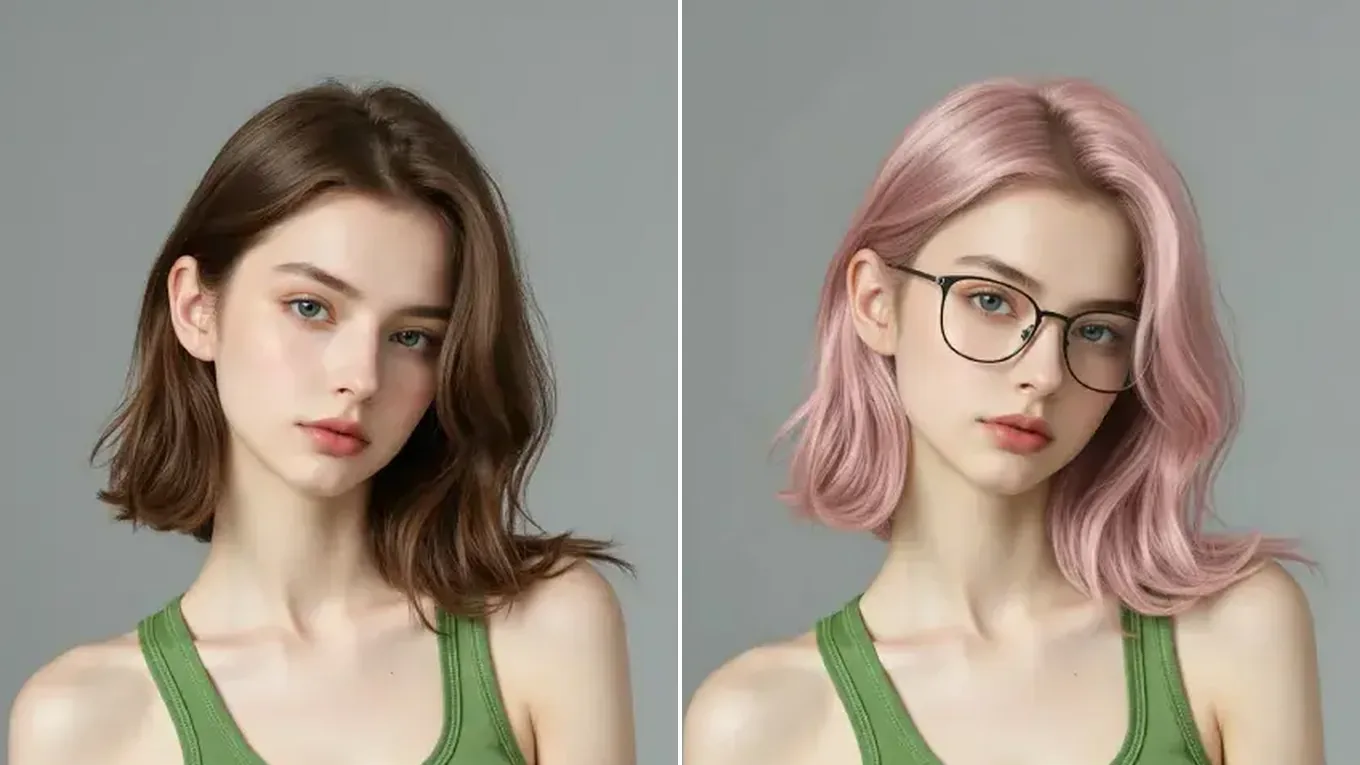
Change hair color and add glasses, keep the face
Two local edits in one pass: the hair turns pastel pink and thin round glasses are added, while the face, makeup, and gray backdrop stay as they were.
Engineered specifically for instruction-driven image editing, the Qwen Image Edit series modifies targeted attributes—hair color, clothing, damaged photo creases, or sign text—while aiming to leave the rest of the image unchanged.
Original Studio PortraitQwen Local Attribute EditQwen Image Edit Workspace
Upload your photo once, pick Nano Banana 2, GPT Image 2.5, Qwen Image Edit, or Seedream 5.0 in the model selector, and compare outputs directly.
Qwen Image Edit Visual Showcase
See how Qwen Image Edit isolates hair color, repairs damaged archival prints, and preserves product geometry.
Two local edits in one pass: the hair turns pastel pink and thin round glasses are added, while the face, makeup, and gray backdrop stay as they were.
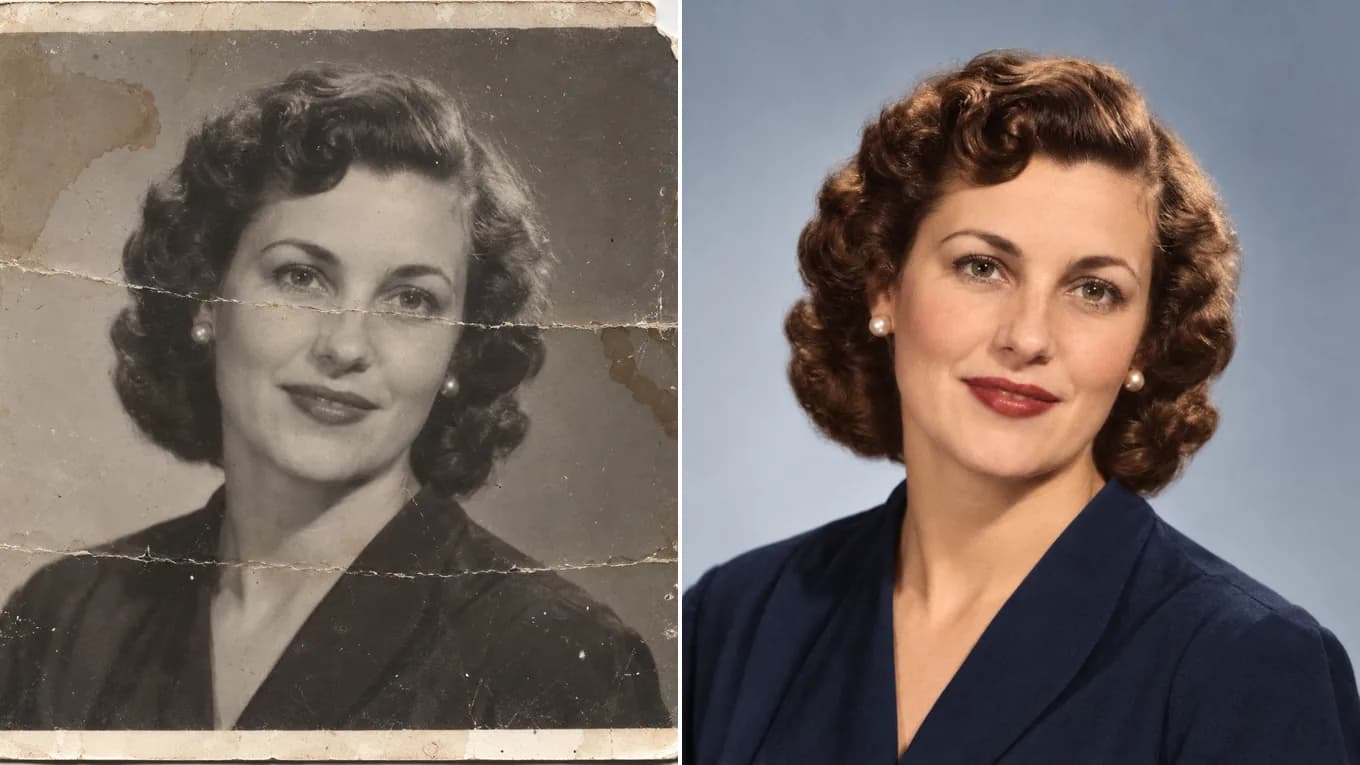
Clears the paper creases, water stains, and torn corner of a vintage print, then adds soft natural color.
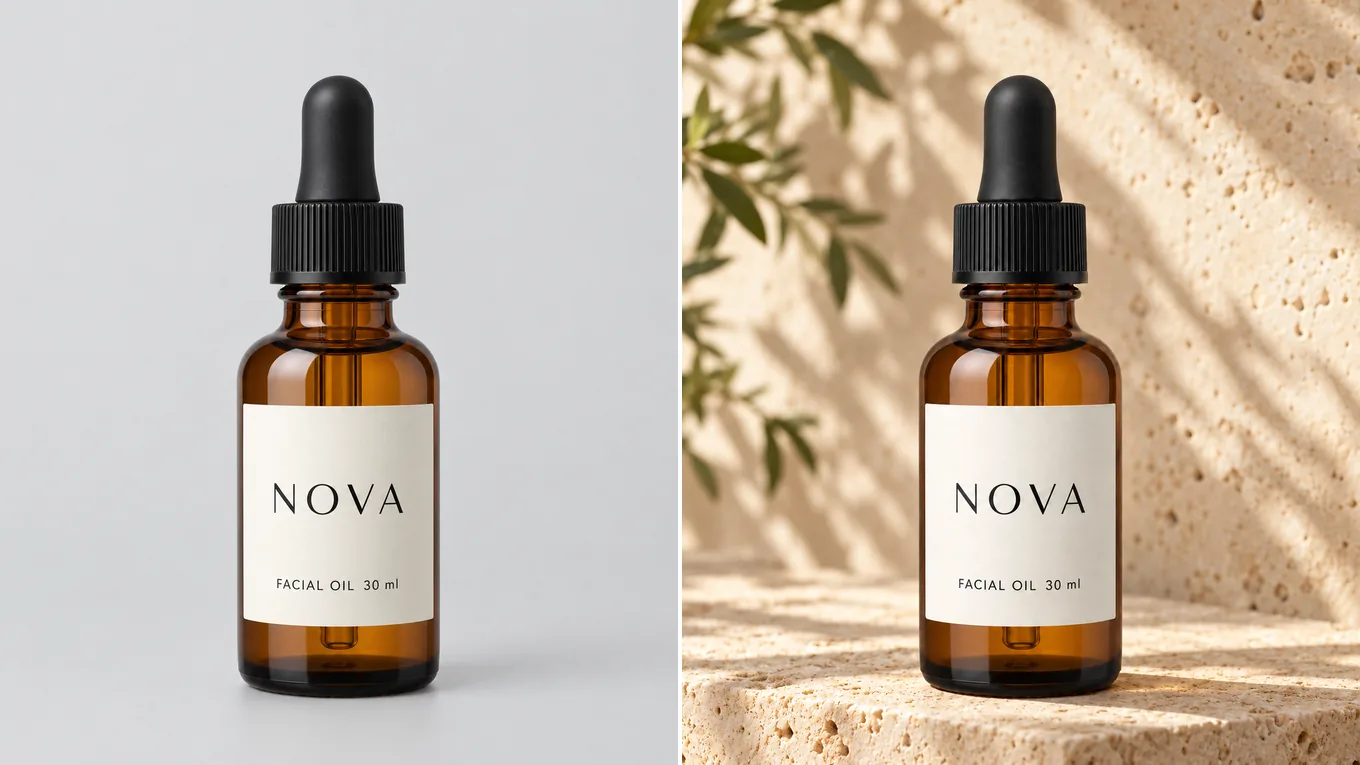
Keeps the bottle silhouette and label while building a warm, sunlit travertine podium scene.
Qwen Image Edit Workflow
Use explicit 'keep X, change only Y' phrasing for maximum precision.
Select Qwen Image 2 Pro or Qwen Image 3 in the studio and upload the photo you want to retouch.
State explicitly which region should remain untouched and which single attribute (hair, jacket, background, or text) should change.
When editing signs, posters, or labels, put the exact replacement text inside quotation marks.
Review fine boundaries around hairlines and fingers, and use 2K output for high-detail portrait or e-commerce exports.
Reviewed byImg2Img Product Team
Published / Updated /
ReferencesOpenAI Image Generation GuideGoogle Gemini Image Generation Docs
Qwen Image Edit Prompt Recipes
Load any prompt below into the studio to test targeted attribute editing.
Keep the person's face, expression, pose, and background completely unchanged. Change only the jacket to a tailored camel wool coat with realistic fabric texture.
Prevents unintended changes to the face or background.
Remove all scratches, creases, and dust from this old photograph and restore natural lifelike color while preserving the exact facial identity and clothing details.
Ideal for damaged family portraits and historical scans.
Keep the entire scene, lighting, and sign material unchanged. Replace the text on the board with "OPEN DAILY" in matching typography and perspective.
Put target text in quotes for accurate rendering.
Explore Workflows & Models
Multi-person portrait fusion, character consistency, rapid conversational photo edits
Interior redesign, commercial product scenes, complex prompt-guided restyling
Ink-wash & anime restyling, high-fashion editorial portraits, 4K visual campaigns
Commercial advertising, brand packaging preservation, architectural concept design
Viral social media cards, 3D pop-out framing, bold retro pixel-art transformations
Edit photos with natural language prompts using our free AI image editor. Restore old photos, change outfits, relight portraits, and swap product scenes while keeping the original composition.
Convert any photo to pencil sketch, charcoal drawing, ink-wash painting, or manga line art online with AI, keeping the likeness, pose, and composition recognizable.
Restore damaged, scratched, and faded vintage photos online with AI. Remove paper creases, glare, and tears while colorizing monochrome portraits with natural skin tones.
Remove unwanted facial shadows, background glare, and hard lighting shadows from photos online with AI. Relight portraits and product shots while keeping the original subject recognizable.
Remove Instagram, TikTok, and oversaturated color filters from photos online with AI. Neutralize warm orange and magenta color casts to restore authentic skin tones and clean lighting.
Remove watermarks, logos, timestamps, and unwanted text from photos online with AI. Seamlessly reconstruct hidden background textures without blur.
Expand photos and uncrop images beyond their original borders online with AI. Extend vertical 9:16 portraits to 16:9 widescreen wallpapers with seamless continuity.
Qwen Image Edit FAQ
How Qwen Image Edit handles local retouching, restoration, and text rendering.
In the Img2Img workspace, Qwen Image Edit capabilities are powered by Qwen Image 2 Pro (high-precision 1K editing) and Qwen Image 3 (supporting up to 3 references and 2K resolution).
Pick Qwen Image Edit when you want to change one thing and leave the rest alone: hair color, clothing, a damaged area of an old photo, or text on a sign. For merging several people into one scene, Nano Banana 2 handles multiple references better.
Qwen Image Edit starts at 5 credits per image. The studio shows the estimate for your settings before you generate, and failed generations return the credits.
Qwen Image Edit is trained specifically on instruction-guided image editing pairs, so it excels at modifying one requested attribute without regenerating the entire image.
Yes. Qwen's vision-language backbone supports accurate bilingual (English and Chinese) text replacement on signs, labels, and posters while matching surface perspective.
You can upload PNG, JPEG, and WebP images up to 10 MB and up to 8,192 pixels per side.