AI Watermark Remover & Inpainting

AI Watermark Remover: Clean Text & Logos Seamlessly

Remove intrusive diagonal watermarks, stock photo proof stamps, date stamps, and copyright text overlays. Reconstruct the occluded background with natural textures instead of ugly smudges.

  • Removes semi-transparent diagonal watermarks, bold text overlays, and date stamps
  • Synthesizes authentic background pixels matching surrounding lighting and grain
  • Aims to keep subject sharpness, edges, and proportions; compare edges at full size
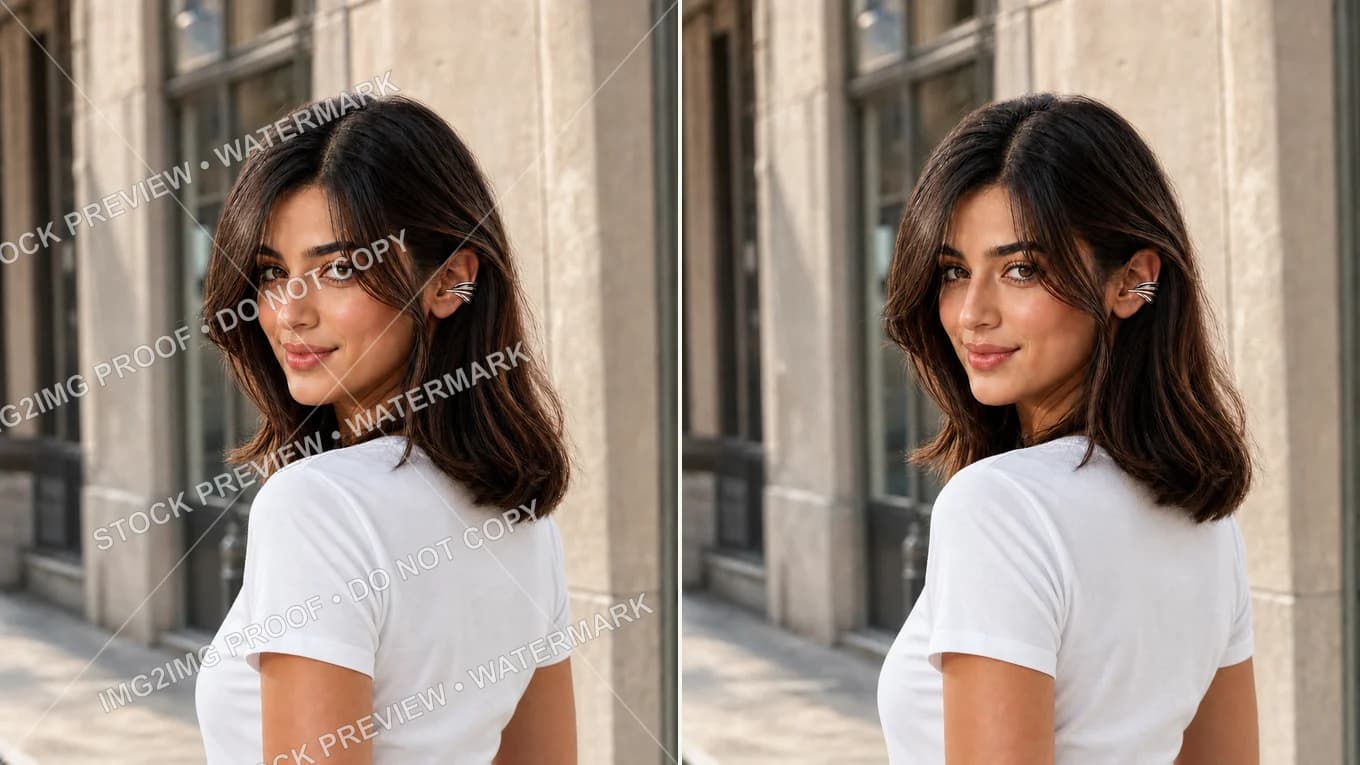
Street portrait overlaid with semi-transparent stock preview watermark text — Clean street portrait with watermark text completely erased and background texture restoredTiled Watermarked PhotoAI Clean & Reconstructed
AI watermark removal rebuilds the textures hidden under overlays across hair, fabric, and stone, using the surrounding detail as reference. Check edges at full size.

Live AI Watermark Remover Studio

Upload your image and erase watermarks cleanly

Upload any JPEG, PNG, or WebP image. Instruct the AI to 'remove all watermark text and reconstruct the background'.

Transformation studio

PNG, JPEG or WebP, up to 10 MB

Upload image0 of 1 images

Try these examples

Credits shown before you generate

Free tier1024 × 1024 · 1K · 1 image

Add an image and prompt to begin

Watermark Removal Before & After Showcase

Overlay removal, compared side by side

Compare date stamps, stickers, and sample overlays before and after removal.

Before and after removing tiled watermark text from street portrait
Source photoAI output
Tiled Proof Removal

Erase diagonal tiled watermark text on street portrait

Removes repeated semi-transparent watermark text across hair and jacket without blur.

Keep the person's face, hair, and clothing completely intact. Remove all white watermark text, proof stamps, and diagonal overlay lines, cleanly reconstructing the background.
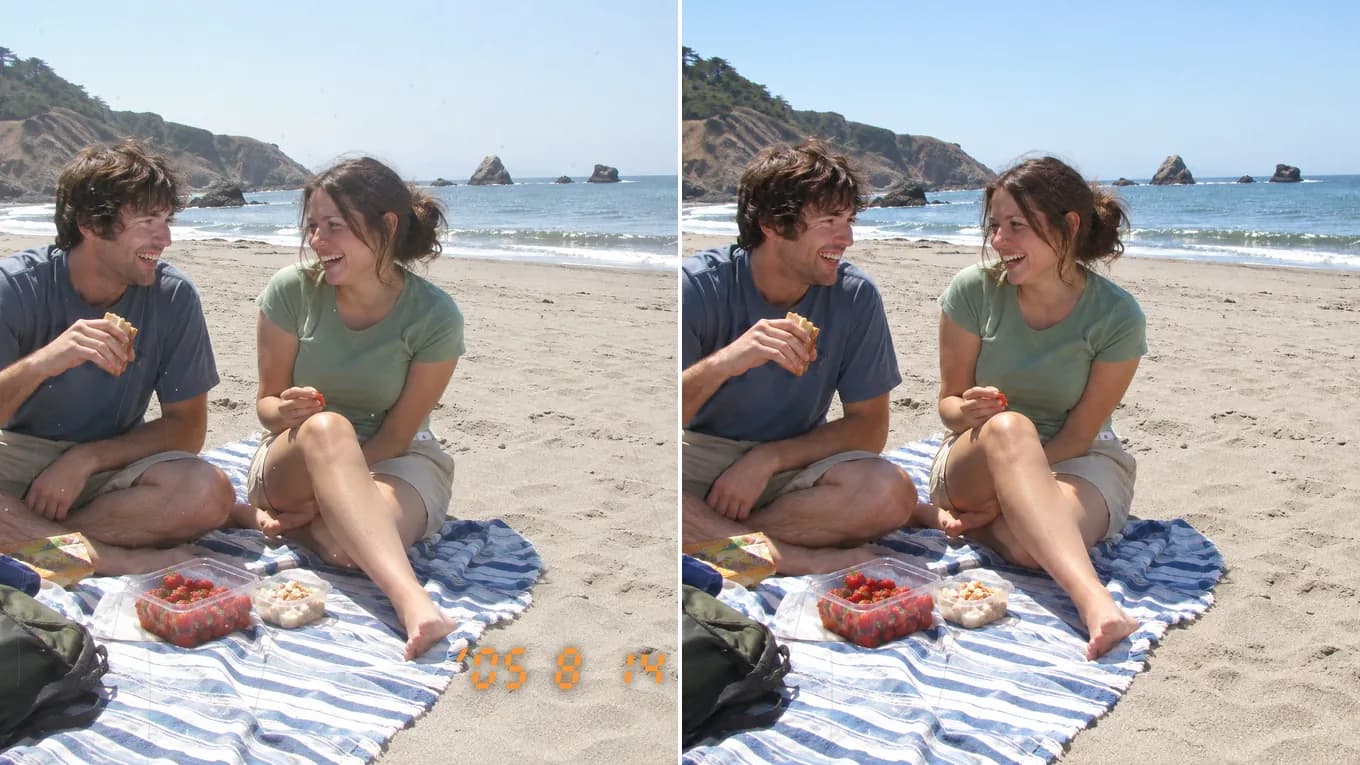
Before and after removing an orange date stamp from a beach snapshot
Source photoAI output
Date Stamp Removal

Erase date stamps and scratches from old snapshots

Removes the orange camera date stamp and fine surface scratches, then rebuilds the sand texture behind them.

Remove the digital camera date stamp and surface scratches from this photo, reconstruct the missing background texture naturally.

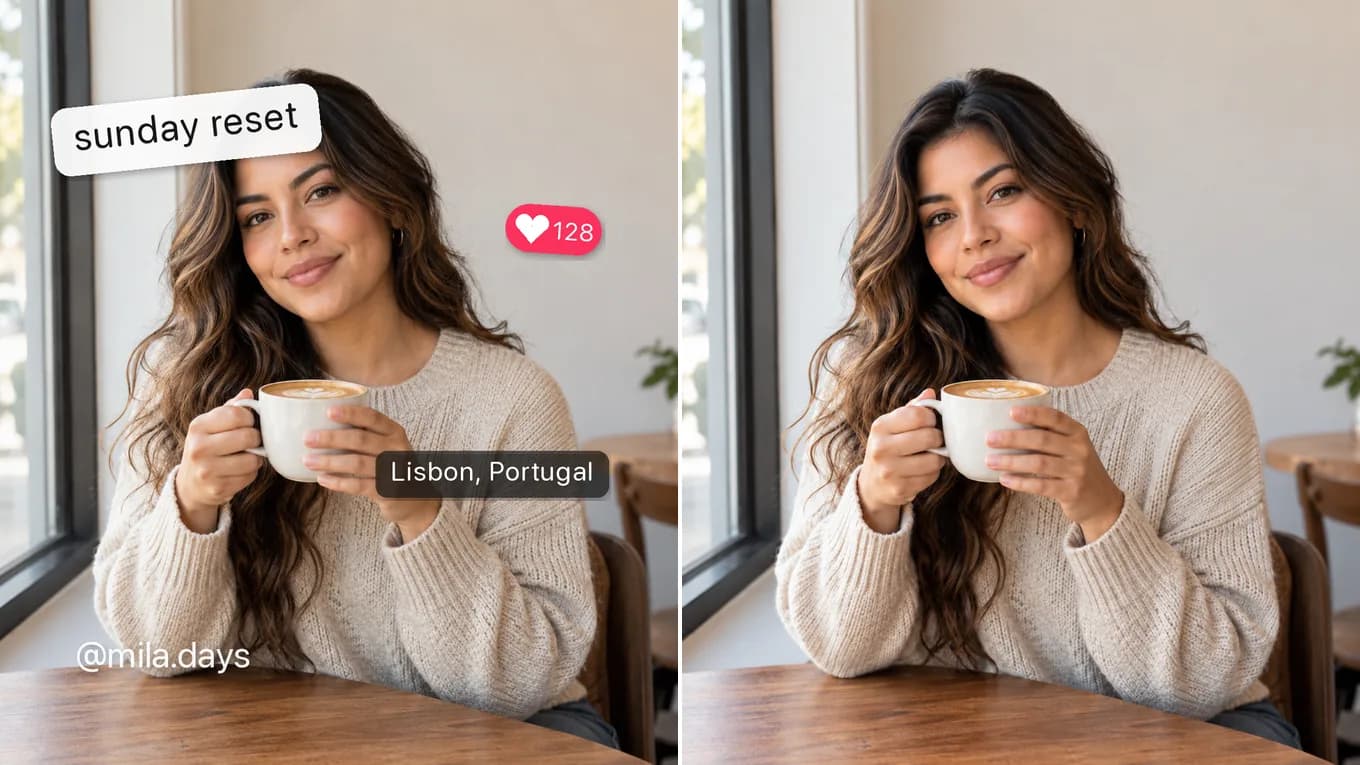
Before and after removing social media stickers and captions from a café portrait
Source photoAI output
Overlay Text Removal

Clear social media captions and UI badges

Removes caption stickers, a like badge, and a username, then fills in the hair and café background behind them.

Remove the text stickers and captions from this image, cleanly inpainting the original hair and background behind them.

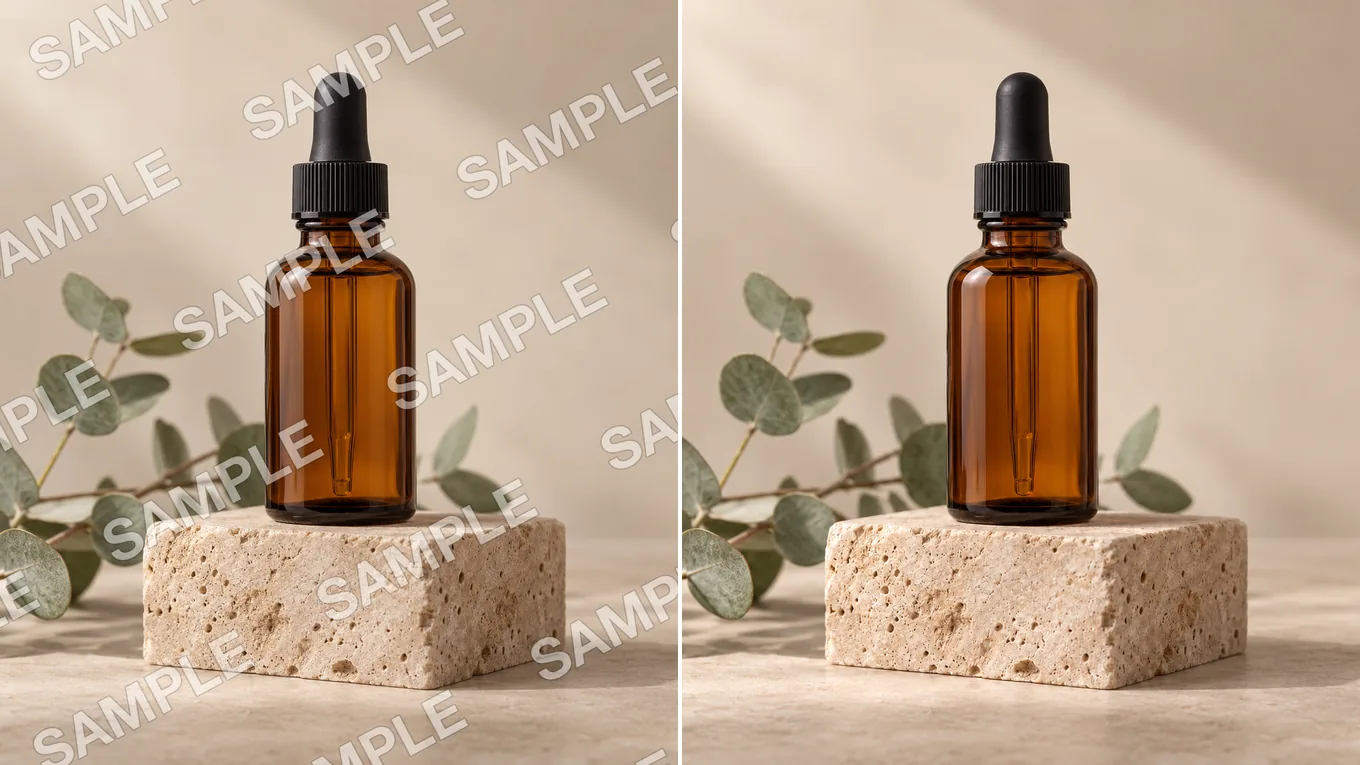
Before and after removing a tiled SAMPLE overlay from a product photo
Source photoAI output
Sample Overlay Cleanup

Clean sample overlays from your own product photos

Removes the tiled SAMPLE text from your own product proof while keeping the glass bottle and stone block crisp.

Keep the bottle, dropper, and stone block unchanged. Remove all of the SAMPLE watermark text and rebuild the backdrop behind it.

Contextual Inpainting Technology

Why AI watermark removal is superior to blur or clone stamps

The model parses the image into subject, structure, and text layers, inpainting the occluded areas with textures that follow the surrounding light and grain.

State the text to remove clearly (e.g. 'remove all white watermark text and diagonal lines from the image').

Accepted formats
PNG, JPEG, WebP up to 10 MB per file
Removes cleanly
Tiled proof watermarks, copyright logos, camera date stamps, subtitles
Structural integrity
Keeps edges and nearby detail; output resolution depends on the selected model

Reviewed byImg2Img Product Team

Published / Updated /

ReferencesOpenAI Image Generation GuideGoogle Gemini Image Generation Docs

4-Step Watermark Removal Workflow

How to remove a watermark with AI

Four steps to a clean, watermark-free image.

  1. 01

    Upload your watermarked image

    Select the photo containing text, logos, or timestamp overlays.

  2. 02

    Lock main subject and composition

    Instruct the model to preserve the person, product, or background scene intact.

  3. 03

    Direct watermark removal

    Specify 'remove all watermark text, logos, and stamps, seamlessly inpainting the background'.

  4. 04

    Inspect edges and download

    Verify that no blurry smudges remain, then export in full 1K or 2K resolution.

Watermark Eraser Prompts

Formulas to erase watermarks cleanly

Click any prompt to load directly into the studio workspace.

Full Clean

Universal watermark & logo removal

Keep the main subject and scene completely unchanged. Remove all watermark text, logo overlays, and semi-transparent stamps, seamlessly reconstructing the hidden background.

Works on tiled text, corner logos, and center stamps.

Use eraser prompt
Date Stamp

Remove camera date & time stamps

Keep the entire photograph exact. Remove the yellow digital date and time stamp in the corner, cleanly inpainting the underlying surface texture.

Ideal for vintage digital camera snapshots.

Use eraser prompt
Text Inpainting

Remove subtitles and banner overlays

Remove the bottom subtitle text banner completely, reconstructing the missing floor and background details seamlessly without blur.

Cleans social media video frame captures.

Use eraser prompt

Explore Workflows & Models

Switch between specialized editing workflows and reference-ready models

Every page uses the same image-to-image workspace so you can test prompts across portrait editing, sketch conversion, and multi-image fusion.

Prompt-Guided AI Image Editor

AI Image Editor

Edit photos with natural language prompts using our free AI image editor. Restore old photos, change outfits, relight portraits, and swap product scenes while keeping the original composition.

Open in Studio
AI Photo to Sketch Converter

Photo to Sketch AI

Convert any photo to pencil sketch, charcoal drawing, ink-wash painting, or manga line art online with AI, keeping the likeness, pose, and composition recognizable.

Open in Studio
AI Old Photo Restoration & Colorization

Old Photo Restoration

Restore damaged, scratched, and faded vintage photos online with AI. Remove paper creases, glare, and tears while colorizing monochrome portraits with natural skin tones.

Open in Studio
AI Shadow Remover & Portrait Relighting

Remove Shadow from Photo

Remove unwanted facial shadows, background glare, and hard lighting shadows from photos online with AI. Relight portraits and product shots while keeping the original subject recognizable.

Open in Studio
AI Filter Remover & Color Neutralization

Remove Filter from Photo

Remove Instagram, TikTok, and oversaturated color filters from photos online with AI. Neutralize warm orange and magenta color casts to restore authentic skin tones and clean lighting.

Open in Studio
AI Image Extender & Outpainting Tool

AI Expand Image

Expand photos and uncrop images beyond their original borders online with AI. Extend vertical 9:16 portraits to 16:9 widescreen wallpapers with seamless continuity.

Open in Studio
Multi-Model Image-to-Image Directory

AI Image Models

Compare top image-to-image AI models side by side. Explore Nano Banana 2, GPT Image 2.5, Qwen Image Edit, and Seedream 5.0 for reference-guided photo editing and restyling.

Explore model guide
Google Gemini Flash Image Architecture

Nano Banana 2

Multi-person portrait fusion, character consistency, rapid conversational photo edits

Explore model guide
OpenAI Multimodal Image Architecture

GPT Image 2.5

Interior redesign, commercial product scenes, complex prompt-guided restyling

Explore model guide
Alibaba Qwen Vision-Language Editing Architecture

Qwen Image Edit

Targeted hair/outfit edits, vintage photo restoration, sign & packaging text edits

Explore model guide
ByteDance Seedream 5.0 Visual Generation Engine

Seedream 5.0

Ink-wash & anime restyling, high-fashion editorial portraits, 4K visual campaigns

Explore model guide
Black Forest Labs Flux Architecture

Flux Kontext

Commercial advertising, brand packaging preservation, architectural concept design

Explore model guide
xAI Grok Visual Intelligence Engine

Grok Imagine AI

Viral social media cards, 3D pop-out framing, bold retro pixel-art transformations

Explore model guide

Watermark Remover FAQ

Questions about AI watermark removal

How AI removes watermarks, recovers textures, and maintains image quality.

Can AI remove semi-transparent watermarks across human hair or faces?

Yes. The AI recognizes natural human textures and reconstructs fine hair strands and skin pores continuously rather than blurring them.

Will the area under the watermark look blurry?

No. Generative inpainting synthesizes matching high-resolution textures with authentic grain rather than applying a simple blur filter.

Can I remove date stamps and corner logos?

Yes. Yellow or red camera date stamps can be cleanly erased with underlying surfaces seamlessly reconstructed.

What formats and file sizes are supported?

PNG, JPEG, and WebP files up to 10 MB and up to 8,192 pixels are fully supported.

Is the watermark remover free to try?

Yes. You can test watermark removal in the browser studio using our free tier or initial credits.

Which model works best for watermark removal?

Qwen Image Edit and GPT Image 2.5 are the most capable models for precision text and watermark erasure.